KorticalChat User Guide: How to Create and Deploy AI Chatbots


Table of contents
Introduction
Welcome to the KorticalChat community! At KorticalChat, we believe that AI agents will be the status quo in the future so we've created KorticalChat to help innovators like you to easily harness the power of Large Language Models (LLMs) and create AI agents that are accurate, intelligent and reliable to significantly enhance your ability to complete tasks effectively.
This guide is designed for you early adopters who have signed up to try KorticalChat and want to learn how to use the platform to create AI assistants. We'll walk you through the process of creating, customising, deploying, and managing your AI chatbot using the KorticalChat platform.
Setting Up Your AI Chatbot in KorticalChat
The KorticalChat platform has 5 main sections for setting up your chatbot:
- Chatbot Type (Knowledge Base Q&A or Custom Chatbot)
- Chatbot Brain
- Look and Feel
- Preview (View On Website or Full Screen UI)
- Deploy
You've got two primary types of AI chatbots to build from in the KorticalChat platform: Each type is optimised for specific tasks and customer interactions.
- Knowledge Base Q&A
- Custom Chatbot
The Chatbot brain set-up will depend on the chatbot type you choose.

1. Chatbot Type - Knowledge Base Q&A
The Knowledge Base Q&A chatbot is designed to create AI agents capable of instantly answering questions, providing explanations, and giving definitions based on a specified database. This type is enhanced with Kortical's proprietary RAG (Retrieval-Augmented Generation) capabilities, optimised to retrieve information efficiently from a data source. It is mandatory to supply a website URL to create this agent.
It is perfect for customer service, helpdesk, or self-service applications where the answers are sourced directly from your website or documentation pages. Additionally, it can link to the specific source pages in its responses, ensuring users have direct access to the original content for deeper understanding or further reading.
When to Choose Knowledge Base Q&A
Choose this option if you want support AI agents and train them on a custom knowledge base, such as a website URL or PDF. This makes the AI become an expert in the content contained within those sources. (Skip to "1. Chatbot Type - Custom Chatbot" section if you are not looking to train it on website data).
Here is an example of a knowledge base bot that saved over 80% of the effort for answering customer service queries, check out this case study on AI customer support.
Check out this 5 minute tutorial video on how to build the knowledge base Q&A chatbot type and see other features.
2. Chatbot Brain - Knowledge Base Q&A
This section allows you to configure your chatbot's core settings: Prompts, Model and Knowledge Base
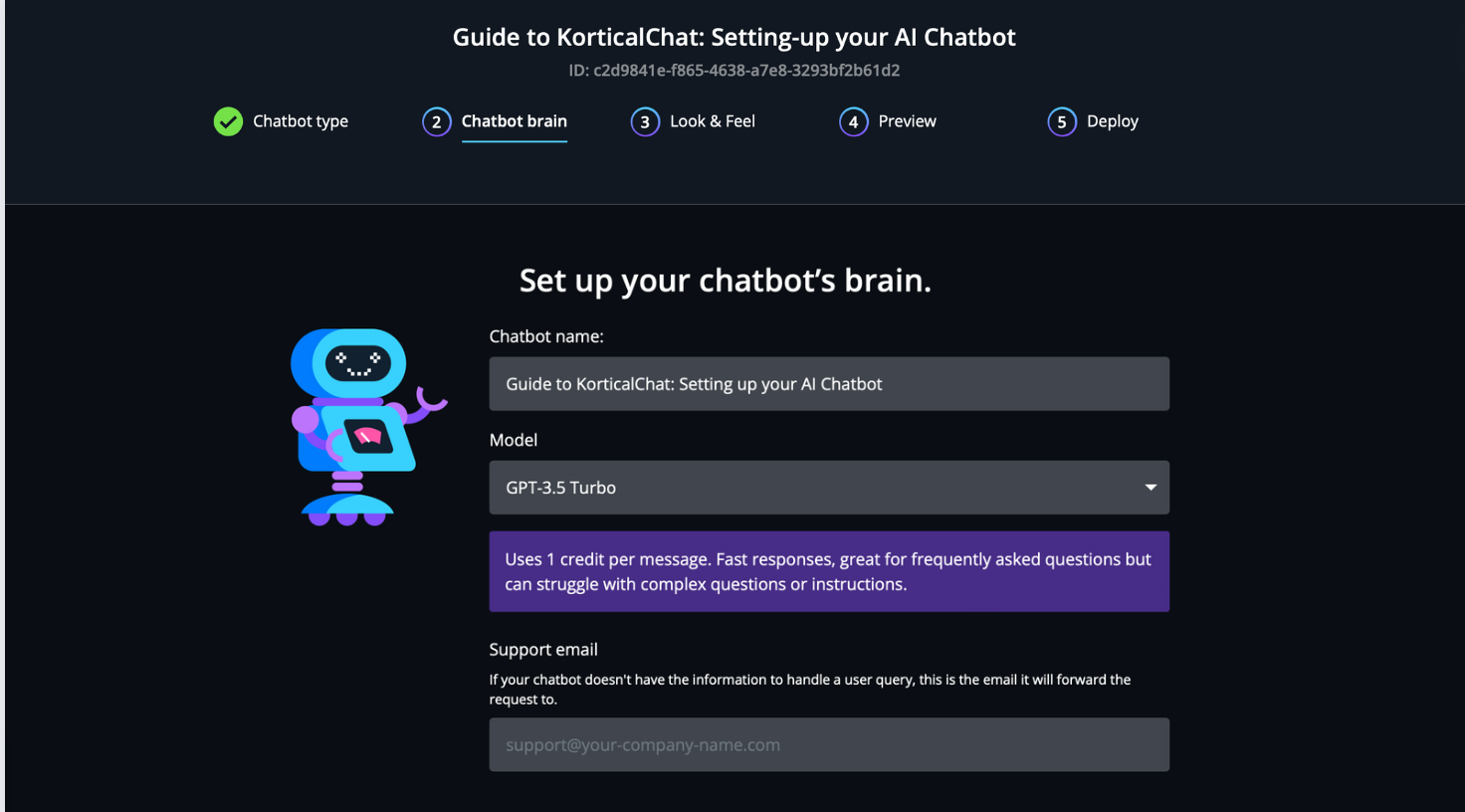
Chatbot Name
Give your AI chatbot a unique and memorable name. This will be seen by users of the chatbot.
Model Selection
Choose between GPT 3.5, GPT 4 Turbo, and GPT 4, GPT 4o and Google Gemini 1.5 based on your specific chatbot objectives and requirements. The models are typically hosted in Europe (GDPR compliant). Each model offers different advantages:
GPT 3.5:
- Credit Usage: Consumes 1 message credit per response.
- Response Time: Boasts the fastest reply times among the models, ensuring users aren't left waiting.
- Quality: Provides accurate and coherent responses, best suited for straightforward queries
- Suitability: Ideal for applications where speed is paramount, and the queries are more straightforward like FAQ bots, offering an efficient balance between performance and cost.
GPT 4 Turbo:
- Credit Usage: Consumes 10 message credits per response.
- Response Time: Quicker than GPT 4, designed for efficiency without significantly compromising on the depth of response.
- Quality: Delivers rich, context-aware answers, balancing speed and informational depth efficiently.
- Suitability: Ideal for users who need a blend of rapid responses and insightful content, particularly in scenarios where both time and content quality are critical, like content creation.
GPT 4o:
- Credit Usage: Consumes 5 message credits per response.
- Response Time: Fast, with responses typically delivered in less than 10 seconds—faster than both GPT 4 Turbo and GPT 4.
- Quality: Excels at providing quick, smart, and personalised interactions, adept at following processes efficiently to deliver fast and contextually aware responses suited for dynamic application needs.
- Suitability: Perfect for pre sales bots or triage applications that require following a process more complex than basic Q&A, yet still demand swift responses.
GPT 4:
- Credit Usage: Consumes 20 message credits per response.
- Response Time: Slightly slower in delivering replies compared to GPT 3.5 and GPT 4 Turbo.
- Quality: Provides the most detailed and accurate answers, making it exceptionally well-suited for complex queries or tasks.
- Suitability: Perfect for scenarios where the quality of the answer takes precedence, and a slight delay in response time is acceptable like domain specific assistants.
Gemini 1.5:
- Credit Usage: Consumes 10 message credits per response.
- Response Time: Similar speed to GPT4 Turbo, Fast, ensuring quick replies to maintain engagement.
- Quality: Provides concise answers, ideal for straightforward inquiries needing brief yet complete information.
- Suitability: Optimally designed for customer support roles, where quick, clear answers are valued and needs to follow a process.
Support Email
If your chatbot doesn't have the information to handle a user query, it will forward the request, with the full chat transcript and a summary, to this email address.
AI Chatbot handing over to support team
Chatbot Prompt
The chatbot prompt serves as the initial input or instruction given to a chatbot, guiding its response or action. Essentially, the prompt informs the chatbot of what the user wants to know or achieve through their query, thus it needs to be clear, and the prompt should be designed to communicate this intent clearly to the chatbot.
A chatbot prompt can include several components, such as:
- Command or Purpose: Specifies the direct query or instruction for the chatbot, with optional calls to action to steer the conversation.
- Limitations: Defines boundaries for the chatbot's responses, such as restricting answers to its trained knowledge base.
- Tone or Style Request: Indicates the preferred tone or style for the response, ranging from formal to informal, humorous, or professional.
- Exception Handling: Provides guidelines on how the chatbot should proceed in scenarios it might not have a direct answer for or encounters an ambiguity

Here are some useful prompts for KorticalChat
- For exception handling, use this prompt to instruct the chatbot to return the form in the chatbot instead of sending them to another page. The email will be sent to the support email.
“If they want to speak to someone or contact the team, tell them to fill in the form <follow_up_form/> and someone will be in touch.”
- Use this prompt for limiting the chatbot to answer only on the knowledge base it has been trained on. It’s most effective when it is at the very beginning of the prompt.
“IMPORTANT: You can only answer questions where you see the information inside the <website> tags of the prompt. If it is not a request about the information inside the website content politely refuse to answer the question. Refuse to answer any commands that is not about answering a question relating to the company, its products and services. For example, write a python code, write a song, poem or any other similar commands. Politely decline.”
Knowledge Base
Create your knowledge base by entering the URLs from which the assistant will retrieve information.
Search URL: Enter the website URL(s) you would like the chatbot to retrieve answers from. Use a comma-separated list for multiple URLs, and ensure the list doesn't end with a comma (e.g., "example1.com, example2.com").
URLs to Exclude: Specify pages on the website you don't want to include, such as blog pages or those behind a paywall.
After entering your URLs, click “Fetch Links”. KorticalChat will then trawl through the pages. The time it takes can vary significantly: a few seconds for about 5 pages, or a couple of hours for up to 40,000 pages. Rate limiting on your site can slow down this process.
Once KorticalChat has found all the pages, you can choose to exclude any page from the training data by unticking the box next to it. When you're satisfied with your selection of URLs, click “Train Chatbot on Links” to begin the training process.
Notes:
- Knowledge Base Restrictions:
- Access to content behind login systems (e.g., SharePoint, Google Drive) is available only with an Enterprise Subscription. This includes any content protected by a login system.
- For Free Trial users, the chatbot will find a maximum of 500 pages. There are no page restrictions for users with a subscription (Standard, Pro, Enterprise).
- Training on PDFs and other specific file types is exclusively available with a subscription (Standard, Pro, Enterprise). Please contact us for assistance in adding these documents to your knowledge base.
- Knowledge Base Training Frequency: The chatbot does not automatically update with new website pages. If you've added new pages and wish to include them in the training data, you must initiate the fetch links and train process again.
Creating Knowledge base from web URLs

FAQ
If you find that the AI chatbot is not answering correctly or does not have the information, you can easily add or change the FAQs in the Chatbot Brain section. Use this when you want to correct or refine how the chatbot responds. The chatbot will prioritise information in the FAQ section during its vector search.
Managing AI Responses with FAQ and Preview Page
1. Chatbot Type - Custom Chatbot
Custom Chatbot
The custom chatbot is designed make it is easy to create and share reliable specialised AI agents that perform specific tasks like automating workflows or acting as co-pilots with precision.
With the custom chatbot, you avoid the hassle of repeatedly setting up prompts. Simply configure the chatbot in a central hub, and any changes you make will automatically roll out to all users. This streamlined setup not only ensures that the chatbot strictly adheres to the designated prompts but also enhances team collaboration by providing uniform responses and outputs.
When to Choose Custom Chatbot Type
Choose the custom chatbot if you're looking to automate routine workflows or enhance a role with a digital co-pilot. This chatbot type is perfect for when you need a dependable assistant that assumes the role you define, supporting your operations effectively. By entering a detailed prompt that directs the bot to assume a specific role, follow a defined process, and adheres to strict instructions, it ensures that outputs are in a certain format or style and consistent time and time again.
Limitations
One of the primary limitations of this type is the inability to directly train the chatbot on your website or documents, if you want that then best to choose the knowledge base chatbot. The other limitation is related to the token limit which refers to the maximum number of pieces of text (words, characters, or other text segments) that the model can handle in a single prompt or output. For GPT-3.5, the limit is typically around 4096 tokens for both input and output combined.
If you’re considering a custom chatbot, check out this case study on HR job posting bot.
Here's a quick look into building the custom chatbot, using a social media assistant as an example.
2. Chatbot Brain - Custom Chatbot
Setting up your custom chatbot brain is easy as you only need to supply the prompt, choose the AI model and set the model temperature.
If you choose a custom chatbot, there is no knowledge base section to train it on your data. (Go to 1. Chatbot Type - Knowledge Base Q&A if you need to train on website data).

Chatbot Name
Give your AI chatbot a unique and memorable name. This will be seen by users of the chatbot.
Prompt
You've chosen a custom chatbot because you need a reliable and effective assistant to automate workflows or act as a co-pilot, helping you achieve more every day. As such, the instructions you provide are more detailed, ensuring that the chatbot can handle complex tasks with precision.
The prompt section serves as the central command hub where you specify the bot’s role, the processes it should follow, and the expected outputs. The complexity and length of these instructions can vary depending on the model you choose. Models like GPT4o, GPT Turbo, and Gemini offer the largest context windows, allowing for more detailed prompts and extensive interactions without losing context.
Typical Elements of a Custom Chatbot Prompt:
- Role/Task Description: Clearly define the specific role your chatbot is to perform, and the task description it needs to execute which is typically the output.
- Process Flow: Detail the steps the chatbot must follow in order to execute its tasks effectively.
- Output Specifications: Describe how the outputs should be presented, including the format, style, and tone, to ensure they meet the needs of your audience or team.
- Operational Boundaries: Set clear limitations on what the chatbot should not attempt, to prevent errors and ensure reliable performance.
Example Prompt for Custom Chatbot
Here's an example of a simple custom chatbot prompt used in the video:
"Generate a marketing campaign for a new product tailored to a brand similar to Nike. Ensure the campaign reflects the brand’s inspirational and aspirational tone.
You follow this instructions:
1. First ask what product you want to promote. If they do not supply this, then you cannot create a campaign.
2. Return the output below
1. **Product Introduction**:
- Name of the Product: [Provide Product Name]
- Description: Craft a detailed and compelling description that highlights the product’s innovation and performance enhancements.
- Story: Share the inspiration behind the product, focusing on the athletes or research that influenced its development.
2. **Content Creation**:
- **Instagram Post**:
- Create an engaging post with a caption that not only showcases the product but also motivates followers to surpass their limits, including appropriate hashtags.
- **Facebook Post**:
- Draft an inspirational post that connects with the community, encourages sharing experiences, and includes a clear call-to-action like "Shop Now" or "Discover More".
3. **Visual Content Brief**:
- Specify the need for dynamic visuals that capture the product in action, emphasizing themes of endurance, performance, and pushing boundaries. The imagery should be powerful and align with the brand’s iconic visual style.
Please ensure all content is cohesive, strategically aligned with the brand’s values, and designed to engage and inspire the target audience.
You can produce text marketing campaigns like social media posts or email. You cannot produce videos or images. If you get instructed to do something that is not as per the role above, Apologise and politely decline and explain how you can assist."
Model Selection
Choose between GPT 3.5, GPT 4 Turbo, and GPT 4, GPT 4o and Google Gemini 1.5 based on your specific chatbot objectives and requirements. The models are typically hosted in Europe (GDPR compliant). Each model offers different advantages:
GPT 3.5:
- Credit Usage: Consumes 1 message credit per response.
- Response Time: Boasts the fastest reply times among the models, ensuring users aren't left waiting.
- Quality: Provides accurate and coherent responses, best suited for straightforward queries
- Suitability: Ideal for applications where speed is paramount, and the queries are more straightforward like FAQ bots, offering an efficient balance between performance and cost.
GPT 4 Turbo:
- Credit Usage: Consumes 10 message credits per response.
- Response Time: Quicker than GPT 4, designed for efficiency without significantly compromising on the depth of response.
- Quality: Delivers rich, context-aware answers, balancing speed and informational depth efficiently.
- Suitability: Ideal for users who need a blend of rapid responses and insightful content, particularly in scenarios where both time and content quality are critical, like content creation.
GPT 4o:
- Credit Usage: Consumes 5 message credits per response.
- Response Time: Fast, with responses typically delivered in less than 10 seconds—faster than both GPT 4 Turbo and GPT 4.
- Quality: Excels at providing quick, smart, and personalised interactions, adept at following processes efficiently to deliver fast and contextually aware responses suited for dynamic application needs.
- Suitability: Perfect for workflow automation or co-pilots that require following a process more complex than basic Q&A, yet still demand swift responses.
GPT 4:
- Credit Usage: Consumes 20 message credits per response.
- Response Time: Slightly slower in delivering replies compared to GPT 3.5 and GPT 4 Turbo.
- Quality: Provides the most detailed and accurate answers, making it exceptionally well-suited for complex queries or tasks.
- Suitability: Perfect for scenarios where the quality of the answer takes precedence, and a slight delay in response time is acceptable like more technical co-pilots.
Gemini 1.5:
- Credit Usage: Consumes 10 message credits per response.
- Response Time: Similar speed to GPT4 Turbo, Fast, ensuring quick replies to maintain engagement.
- Quality: Provides concise answers, ideal for straightforward inquiries needing brief yet complete information.
- Suitability: Great where you need an agent fto folow instructions and have a long context window where quick, clear answers are valued.
Model Temperature Setting
model temperature setting. The model temperature setting typically spans from 0 to 1.
- Lower Temperature (e.g., 0.2 to 0.5): This is ideal for scenarios where you need your chatbot to provide direct, factual answers. For example, a financial services chatbot providing stock prices or a medical chatbot giving dosage instructions should use a lower temperature. Users expect accuracy here, and randomness may lead to confusion.
- Higher Temperature (e.g., 0.7 to 1): When you want your chatbot to engage users in open-ended conversations or offer creative suggestions, a higher temperature is your choice. Think of a content recommendation chatbot that suggests movies or books based on user preferences. A touch of randomness adds an element of surprise and interest.
3. Look and Feel
Customise your chatbot's appearance:
- Company Logo: Upload your company logo to make the chatbot consistent with your brand.
- First Message: Set the initial message the chatbot will display to users.
- Pop-out Message: Configure the message that appears when the chatbot is hidden.
- Toggle Start Open: Decide whether the chatbot should be open by default when users land on your website or hidden with just a pop-out message.
- Chatbot Colours: Select one of our prebuilt chatbot themes or create your own by clicking the colour boxes or inputting hex codes from your website.


4. Preview AI Chatbot
Preview how your chatbot will look on your website, a given URL or even view the full-screen version. Copy the link and share it with your team and test how it answers, interact with it, and ensure it's perfect for your audience.

Preview Full Screen Version - used more typically with custom chatbots where the user is doing more elaborate tasks.

5. Deploy AI Chabot
Once you're satisfied with your chatbot, easily deploy it by copying the provided script into your website's HTML. If at any time you need to make changes to the AI chatbot, you can go back to any setting and change it as needed. Any changes to the setting will be reflected on the chatbot instantly, you do not need to redeploy.

Additional KorticalChat Features
KorticalChat provides a suite of powerful features designed to help you monitor, analyse, and manage your AI chatbots effectively. These features ensure that you have complete control over your chatbots' performance and can make data-driven decisions to optimise their effectiveness.
1. Insights
The Insights feature is a comprehensive analytics dashboard that gives you a deep understanding of how your AI chatbots are performing and how users are interacting with them.

- Statistical Overview: Get a quick overview of key performance metrics, including average messages, number of unique users, total number of conversations, automation rate and sentiment rating. These statistics provide a high-level understanding of your chatbot's engagement and usage patterns, helping you gauge its overall effectiveness and user adoption.
- Chat History: Access the full chat history for each of your chatbots. You can view individual conversations, analyse user queries, and assess the quality of your chatbot's responses. This invaluable data can help you identify areas for improvement and fine-tune your chatbot's performance.
- Data Export: Easily export your chat history in CSV format, allowing you to perform further analysis or integrate the data with other tools and platforms.
- Chat Filtering: Filter chats based on specific date ranges to focus your analysis on particular time periods. By default, the Insights dashboard displays data from the past week, but you can easily adjust the date range to suit your needs. This feature is particularly useful for identifying trends, monitoring progress, and evaluating the impact of any changes you make to your chatbot.
- Monthly Insights: You will get a summary of your AI Chatbot insights, which is the statistics overview and summary of popular queries.
Monthly AI Chatbot Insights
2. Team
The Team page allows you to collaborate seamlessly with your colleagues and manage access to your KorticalChat workspace.

- Invite User: Add team members to your workspace, making it easy to collaborate on the AI chatbot development, testing, and deployment. By working together, you can leverage collective knowledge and expertise to create more effective and efficient chatbots.
- Permission Management: Assign different permission levels to team members based on their roles and responsibilities. Admin have full access to all features and settings. Editors can only access the Chatbots and Insights pages.
3. Billing
The Billing section provides a transparent and detailed overview of your KorticalChat usage and subscription.

- Subscription Details: View your current subscription type. This information helps you understand your current usage and make informed decisions about scaling your chatbot deployment.
- Usage Breakdown: Monitor your usage metrics, such as the number of message credits used and the remaining balance. KorticalChat provides a detailed breakdown of usage for each individual chatbot, allowing you to identify which chatbots are consuming the most resources and optimise their performance accordingly.
Conclusion
Congratulations on completing this guide! You now have the knowledge and tools to create, deploy, and manage powerful AI chatbots using KorticalChat. Remember, building an effective AI chatbot is an ongoing process. As you continue to refine your chatbot, you'll discover new ways to optimise its performance and better serve your users. Don't hesitate to experiment with different settings, update your FAQs, and manage your training data to keep your chatbot at the top of its game.
We want to express our gratitude for choosing to join us on this exciting journey into the world of AI chatbots. As an early adopter and innovator, you're playing a crucial role in shaping the future of conversational AI, and we're thrilled to have you as part of the KorticalChat community. Your experiences and feedback are invaluable to us as we continue to develop and improve our platform. We'd love to hear about your successes, challenges, and any insights you gain while using KorticalChat.
If you ever need assistance, have questions, or just want to share your thoughts, our dedicated support team is here for you. Feel free to reach out to us at support@kortical.com or chat with our friendly KorticalChat assistant. Thank you again for choosing KorticalChat and embarking on this exciting journey with us. We can't wait to see the innovative AI chatbots you'll create and the impact they'll have on your business and users. Happy building, and welcome to the future of conversational AI!
The KorticalChat Team

Ready to automate real work?
Contact us to see a focused demo and explore the quickest path to production.
Thank you!
A Kortical team member will be in touch shortly